Choosing the best IPTV player comes down to one thing first: which device you're using. The same player app that delivers an excellent experience on an Android TV box may not be available at all on an iPhone or a Samsung Smart TV. Device compatibility determines your options; features and interface determine which option is best for you.
Important to understand before choosing: An IPTV player is separate software from your IPTV subscription. The player is the app you install — it provides the interface for browsing channels, an Electronic Program Guide (EPG), and video playback. The subscription is what you purchase from a provider — it gives you login credentials (a server URL, username, and password, or an M3U link) that you enter into the player. A player app without a subscription is empty. A subscription without a compatible player cannot be watched.
FoxTele is not affiliated with any of the player apps reviewed in this article. Platform availability, pricing, and features are controlled by their respective developers and may change.
What Is an IPTV Player?
An IPTV player is an application that reads your subscription credentials and turns them into a watchable television interface. When you enter your Xtream Codes login (server URL, username, password) or M3U playlist URL into a player app, the app contacts your provider's server, downloads your channel list, and displays it in its interface — complete with an EPG schedule guide, categories, and a VOD library if your subscription includes one.
Different player apps offer different interfaces, EPG quality levels, feature sets, and device compatibility — but they all do the same essential job: connect your credentials to your screen.
How to Compare IPTV Players
| Criteria | Why it matters |
|---|---|
| Device compatibility | The most important factor — not every player runs on every platform |
| App store availability | Determines whether installation requires sideloading |
| Xtream Codes support | The most common subscription login format |
| M3U support | Universal playlist format — all reviewed players support this |
| EPG quality | Affects how easily you find what's on and what's coming |
| Interface style | TV-style grid vs. mobile-style tile dashboard |
| Recording | Not available in all players; requires external storage |
| Multi-view | Watching multiple channels simultaneously |
| Free vs. paid | Whether core features require a purchase |
| Ease of setup | Relevant for beginners |
IPTV Players Compared: Quick Reference Table
| Player | Best for | Android TV / Fire OS | Vega OS Firestick | iPhone / iOS | Samsung / LG TV | Windows / Mac | Free version | Paid/Premium |
|---|---|---|---|---|---|---|---|---|
| TiviMate | Android TV boxes, Fire OS Firestick | Yes (Google Play / sideload) | No — sideloading not supported | No | No | No | Yes (1 playlist, limited) | ~$9.99/yr or ~$33.99 lifetime |
| IPTV Smarters Pro | Multi-device households, iOS, Samsung/LG | Yes (Google Play + Amazon Appstore) | Yes — Amazon Appstore | Yes (Smarters Player Lite on App Store) | Yes — Samsung App Store / LG Content Store | Yes | Yes | Free on most platforms |
| XCIPTV | Best free option for Android/Fire OS | Yes (sideload only) | No — sideloading not supported | No | No | No | Yes — completely free | No paid tier |
| GSE Smart IPTV | iPhone, iPad, Apple TV | Yes (Google Play) | No | Yes — App Store | No | macOS only | Yes (with ads / limited) | Optional IAP (~$20 lifetime per some users) |
| OTT Navigator | Power users on Android, free recording | Yes (Google Play / sideload) | No | No | No | No | Yes | ~$0.99/month premium |
| Smart IPTV / IBO Player | Samsung or LG Smart TV native | No | No | No | Yes — native app stores | No | Varies | Varies |
| VLC | Basic M3U playback on Windows or Mac | Limited | No | Limited | No | Yes — native | Yes | No |
*All pricing and availability subject to change. Verify current listing in your platform's app store before downloading.*
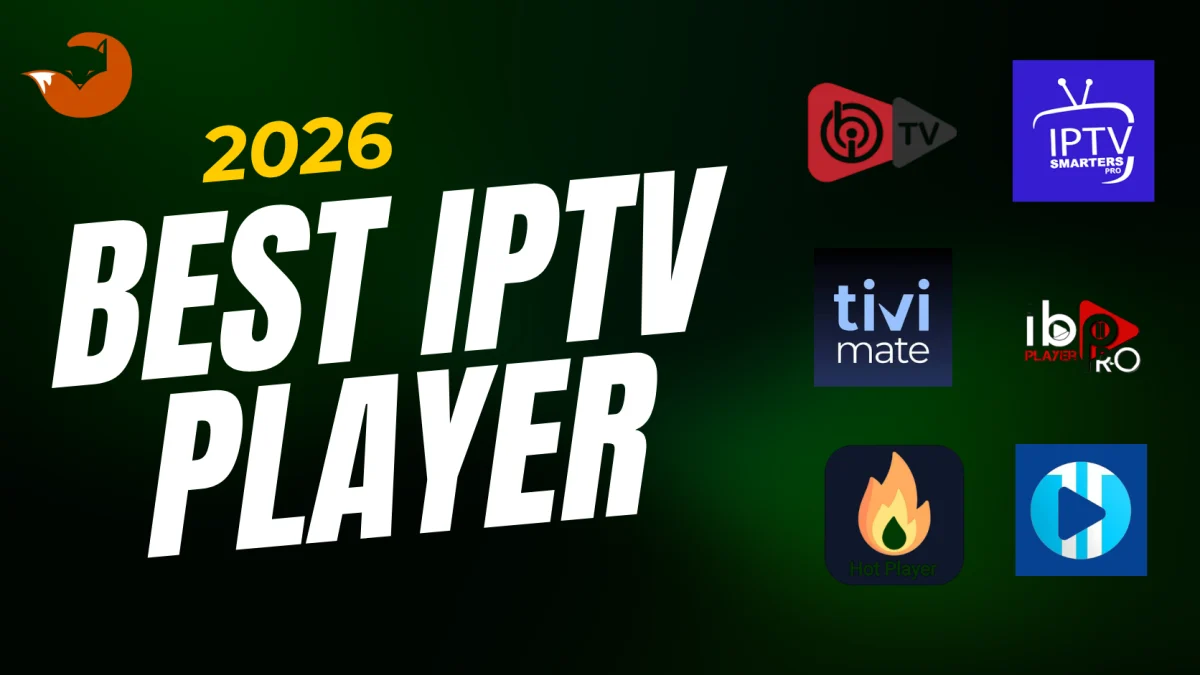
TiviMate
TiviMate is widely regarded as the best IPTV player for Android TV and Fire OS Firestick. Its full-screen EPG grid — displaying channel listings across a scrollable timeline with program descriptions, search, reminders, and 7-day data — is the strongest EPG implementation of any reviewed player. Channel switching is fast even on large playlists, and the interface is designed around TV remote navigation rather than touchscreen interaction.
Best for: Android TV boxes, Google TV devices, Fire OS Firestick (4K, 4K Max, 4K Plus, Cube)
Platform availability: Android TV and Google TV via Google Play; Android phones and tablets via Google Play (may not appear in mobile Play Store search on all devices — install via web.play.google.com if needed); Fire OS Firestick via sideloading using the Downloader app
What it does NOT support: iPhone, iPad, Apple TV, Samsung Tizen, LG webOS, Windows, Mac, and Vega OS Firestick models (Fire TV Stick 4K Select and Fire TV Stick HD 2026 — sideloading is not available on these devices)
Free vs. Premium: The free version supports one playlist and basic live TV viewing. The Premium upgrade (purchased through the TiviMate Companion app on Google Play) unlocks multiple playlists, PVR recording to external storage, multi-view (watching several channels simultaneously), catch-up TV, and favorites backup. Premium covers up to 5 devices per license. See the TiviMate official site for current purchase information.
For a detailed side-by-side comparison with IPTV Smarters, see TiviMate vs IPTV Smarters.
IPTV Smarters Pro
IPTV Smarters Pro is the most broadly compatible IPTV player available in 2026. If you use multiple device types — or if your primary device is an iPhone, Samsung Smart TV, LG Smart TV, or a Vega OS Firestick — Smarters is frequently the only viable option from this list.
Best for: Multi-device households, iOS users, Samsung and LG Smart TV users, Vega OS Firestick owners, beginners
Platform availability: Android phones/tablets (Google Play), Android TV/Google TV (Google Play), Amazon Firestick and Fire TV — all models including Vega OS (Amazon Appstore, no sideloading required), iPhone and iPad (Apple App Store, listed as "Smarters Player Lite"), Apple TV, Samsung Smart TV (Samsung App Store), LG Smart TV (LG Content Store), Windows (via IPTV Smarters website), macOS
Free vs. paid: Free on most platforms. Some platform-specific versions may show optional upgrades — check your current app store listing for pricing.
Interface: Tab-based dashboard with separate sections for Live TV, Movies, Series, and Catch-Up. Works well across both phone screens and televisions. Slightly less polished than TiviMate on TV-sized displays; more accessible for mobile and tablet use.
Limitation: Channel switching is generally slightly slower than TiviMate on large playlists, particularly noticeable during live sports when switching channels frequently.
XCIPTV
XCIPTV is the strongest completely free IPTV player for Android and Fire OS users in 2026. It is entirely free — no paid tier, no in-app purchases — and includes features that other players reserve for premium subscribers: DVR recording, multi-view (multiple channels simultaneously), parental controls, and a polished Netflix-style VOD interface.
Best for: Android TV and Fire OS Firestick users who want a fully featured free player
Platform availability: Android TV, Google TV, Fire OS Firestick, and Android phones/tablets — sideloading required on all devices
Critical limitation: XCIPTV is not available in the Amazon Appstore or Google Play. It must be sideloaded on every device. This means it cannot be used on Vega OS Firestick models (Fire TV Stick 4K Select, Fire TV Stick HD 2026), where sideloading is not supported. It is also not available on iOS, Samsung Tizen, LG webOS, Windows, or Mac.
Notable feature: XCIPTV supports external video playback through third-party players (including MX Player and VLC), which can improve compatibility with stream formats the app's built-in engine doesn't handle as well.
Supports M3U, Xtream Codes, FastoCloud, and EZ Server playlist formats.
GSE Smart IPTV
GSE Smart IPTV is the primary dedicated IPTV player for iPhone, iPad, and Apple TV users in 2026. It is available directly in the Apple App Store, requires no special settings or sideloading, and supports both M3U playlists and Xtream Codes API login.
Best for: iPhone, iPad, Apple TV users
Platform availability: iOS (iPhone and iPad — Apple App Store), Apple TV, Android (Google Play), macOS
Free vs. paid: Free to download with optional in-app purchases to remove ads or unlock additional features. Check GSE Smart IPTV on the App Store for current pricing.
Features: EPG support, AirPlay to Apple TV or AirPlay-compatible display, custom channel grouping, favorites, and an interface that follows iOS design conventions.
Limitation: Not natively available on Firestick (Amazon Appstore), Samsung Tizen, LG webOS, or Windows. Users who want the same app across iOS and a Windows PC will need to use a different player on the PC.
Other IPTV Players Worth Considering
OTT Navigator is the most customizable free IPTV player available for Android TV and Fire OS devices. It has more settings than most users will ever adjust, but for power users who want granular control over EPG sources, channel grouping, and display layout, nothing on Android comes close. It includes recording in the free version — one of only two players here (alongside XCIPTV) that offer recording without a payment. Available on Android TV, Google TV, and Fire OS via sideloading. A premium upgrade (~$0.99/month) unlocks additional playlist and configuration options. Not available on iOS, Samsung Tizen, LG webOS, Windows, or Mac.
Smart IPTV and IBO Player are available directly in the Samsung App Store (Tizen) and LG Content Store (webOS) — making them the practical choices for users who want IPTV natively on a Samsung or LG Smart TV without connecting an external device. Smart IPTV generally has a better EPG implementation between the two. Both require no sideloading on Samsung and LG displays.
VLC is worth mentioning for Windows and Mac users who want the simplest possible M3U playlist setup without installing dedicated IPTV software. VLC is free, open-source, and available on all platforms. It can open an M3U URL directly (Media > Open Network Stream, paste the M3U URL). It does not offer a dedicated IPTV interface — no Xtream Codes API support, no EPG, no favorites, no channel categories — but for basic playlist playback on a computer, it requires no additional setup.
Best IPTV Player for Firestick
Fire OS Firestick (4K, 4K Max, 4K Plus, Cube, 2024 Fire TV Stick HD): TiviMate is the strongest choice for users comfortable with sideloading. IPTV Smarters Pro (available directly from the Amazon Appstore, no sideloading) is the easier installation option and performs well for most viewing needs. XCIPTV is the best fully free option, also via sideloading.
Vega OS Firestick (Fire TV Stick 4K Select released Oct 2025, Fire TV Stick HD released Apr 2026): TiviMate and XCIPTV are not usable — sideloading is not supported on Vega OS. IPTV Smarters Pro is available in the Amazon Appstore and is the primary option for these models.
For full Firestick setup instructions, see How to Install IPTV on Firestick.
Best IPTV Player for Android TV and Google TV
TiviMate installs directly from Google Play on all Android TV and Google TV devices — no sideloading required. It is the strongest choice for television-focused viewing. IPTV Smarters Pro and XCIPTV (sideload) are solid alternatives. OTT Navigator is recommended for power users who want advanced customization at no cost.
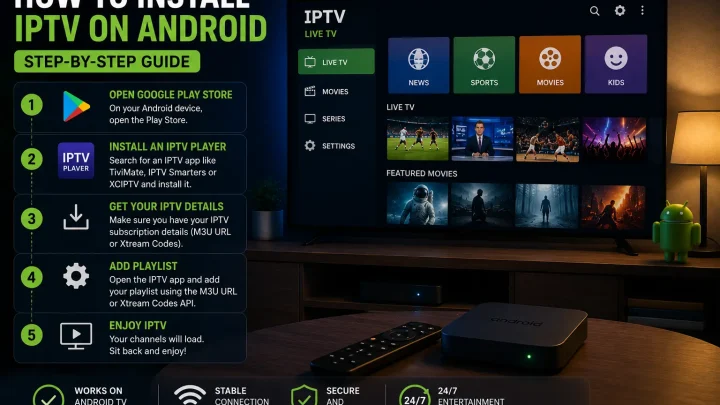
For Android setup guidance, see How to Install IPTV on Android.
Best IPTV Player for Android Phone or Tablet
IPTV Smarters Pro is the most practical choice — it installs from Google Play and has a mobile-friendly tab interface. TiviMate is available via Google Play for many Android phones but may not appear in all regional Play Store mobile searches; install via web.play.google.com if it doesn't appear in search. XCIPTV works on Android phones via sideloading.
For Android setup guidance, see How to Install IPTV on Android.
Best IPTV Player for Smart TV
This depends entirely on which operating system your Smart TV runs.
Samsung Smart TV (Tizen): Smart IPTV or IBO Player from the Samsung App Store. IPTV Smarters is also listed in the Samsung App Store on some models. TiviMate and XCIPTV are not available.
LG Smart TV (webOS): Smart IPTV, IBO Player, or IPTV Smarters from the LG Content Store. TiviMate and XCIPTV are not available on webOS.
Android TV / Google TV-based television (Sony, TCL, Hisense, Chromecast with Google TV): Full Google Play Store access — TiviMate, IPTV Smarters Pro, and most other players available. These TVs offer the best player selection of any Smart TV platform.
App availability varies by region and TV model year. Confirm your specific TV's app store listings before subscribing to any service.
Best IPTV Player for iPhone and iPad
IPTV Smarters Pro (listed as "Smarters Player Lite" in the Apple App Store) is the most widely compatible option — it works on iPhone, iPad, and Apple TV with free core functionality.
GSE Smart IPTV is available in the App Store and offers a more feature-rich iOS-native experience with better EPG customization, AirPlay support, and cross-iOS-device sync.
TiviMate and XCIPTV are not available on any iOS device.
Free vs. Paid IPTV Players
All major IPTV players offer a usable free version. Paid upgrades unlock specific features — not the basic ability to watch channels.
Free versions generally cover:
- Loading one or more playlists (varies by app)
- Live TV browsing and playback
- Basic EPG
- M3U and Xtream Codes support
Paid upgrades typically add:
- Multiple concurrent playlists
- PVR recording to external storage
- Multi-view (multiple channels simultaneously)
- Advanced EPG with reminders and extended data
- Ad removal
- Backup and restore of settings
Free players with no paid tier: XCIPTV is completely free with all features included — including recording and multi-view. OTT Navigator includes recording in its free version.
If you're evaluating IPTV for the first time, starting with a free player (IPTV Smarters Pro or XCIPTV on Android) lets you assess the service before committing to any player purchase.
Xtream Codes vs M3U: Which Format Should You Look For?
Your IPTV provider determines which format they supply — you don't choose, they provide it. But understanding the difference helps you confirm your player supports the format before subscribing.
Xtream Codes login provides three pieces of information: a server URL, a username, and a password. You enter these into the player's "Xtream Codes API" or "Xtream login" option. The player contacts the server, verifies your credentials, and automatically organizes your Live TV, VOD, and Series into separate sections. EPG usually loads automatically.
M3U playlist URL is a single web address containing your entire channel list. You paste this URL into the player's "Load Playlist" or "M3U URL" option. Organization depends on how the provider structured the playlist. A separate EPG (XMLTV) URL may be required for guide data.
All players reviewed in this article support M3U. All except VLC support Xtream Codes API. If your provider offers both, Xtream Codes generally provides a better organized and faster-loading experience.
Which IPTV Player Should You Choose?
Use this decision framework:
Your device is a Fire OS Firestick (4K, 4K Max, or older) and you want the best experience: TiviMate (sideload) or IPTV Smarters Pro (Amazon Appstore, no sideloading required)
Your device is a Vega OS Firestick (Fire TV Stick 4K Select or Fire TV Stick HD 2026): IPTV Smarters Pro — it's the only major player in the Amazon Appstore for these models
Your device is an Android TV box or Google TV device: TiviMate (Google Play) for the best TV interface; IPTV Smarters Pro as the cross-device alternative; XCIPTV (sideload) if you want a free option with recording
Your device is an iPhone or iPad: IPTV Smarters Pro (Smarters Player Lite on App Store) for free cross-platform use; GSE Smart IPTV (App Store) for a richer iOS-native experience
Your device is a Samsung or LG Smart TV (no external streaming device): Smart IPTV or IBO Player from the respective native app store; IPTV Smarters if listed in your region's store
You want one app across all your devices: IPTV Smarters Pro — it covers the most platforms of any reviewed player
You want the best free option on Android/Firestick (with recording): XCIPTV or OTT Navigator — both include recording at no cost
You want the most advanced EPG and fastest channel switching on Android/Fire TV: TiviMate Premium
You just need basic playlist playback on a Windows or Mac computer: VLC (free, no setup required beyond pasting the M3U URL)
How to Set Up an IPTV Player
The setup process is similar across all players:
- Install the player app from the appropriate source (official app store or, where required, sideloading)
- Open the app and accept any terms
- Select the login method: Xtream Codes API (enter server URL, username, password) or M3U URL (paste the playlist link)
- Wait for the playlist to load — this can take 15 seconds to a couple of minutes depending on playlist size and connection speed
- If EPG doesn't load automatically (common with M3U), enter the EPG URL your provider supplied in the app's EPG settings
- Browse channels, configure favorites, and adjust playback settings as needed
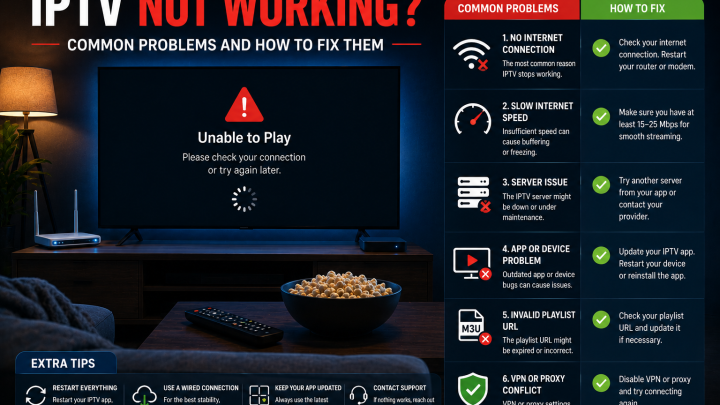
IPTV Player Not Working?
If your player isn't loading channels or content after setup, check these first:
- Confirm your internet connection is working
- Re-enter credentials using copy-paste — a single typo prevents loading
- Reload or refresh the playlist from within the player
- Update the app through your device's app store
- Restart the device and reopen the app
- Test the same credentials in a second player app to isolate whether the issue is app-specific
For a full diagnostic guide, see IPTV Not Working or How to Fix IPTV Buffering.
FoxTele and IPTV Players
FoxTele is an IPTV subscription service. After subscribing, FoxTele provides Xtream Codes credentials — the server URL, username, and password you enter into your chosen player app. FoxTele credentials are compatible with any player that supports the Xtream Codes API format, including TiviMate, IPTV Smarters Pro, XCIPTV, GSE Smart IPTV, and OTT Navigator.
Before subscribing, confirm which player app is available on your specific device and which installation method it requires. FoxTele support can assist with device compatibility questions before you order.
Explore FoxTele plans to compare the available prepaid durations and start an order request.
Ready to Use Your Chosen Player with FoxTele?
FoxTele provides Xtream Codes credentials after order review – the same details you enter into TiviMate, IPTV Smarters, XCIPTV, or any Xtream Codes-compatible player. Before ordering, confirm which player works on your device. Contact support if you need help with compatibility.
Frequently Asked Questions
What is the best IPTV player?
It depends on your device. TiviMate is best for Android TV and Fire OS Firestick. IPTV Smarters Pro is the top cross-platform option – covering iOS, Samsung, LG, all Firestick models, and desktop. XCIPTV is the best completely free option for Android and Fire OS. GSE Smart IPTV is the strongest iOS-native choice.
Is TiviMate better than IPTV Smarters?
TiviMate has a more polished TV interface and faster EPG on Android. IPTV Smarters supports more platforms – including iOS, Samsung, LG, Windows, and all Firestick models including Vega OS. Neither is universally better – the right choice depends on your device. See the full TiviMate vs IPTV Smarters comparison for detail.
What is the best IPTV player for Firestick?
For Fire OS Firestick (4K, 4K Max, Cube): TiviMate (sideload) for best experience; IPTV Smarters Pro (Amazon Appstore) for easiest install. For Vega OS Firestick (4K Select, Fire TV Stick HD 2026): IPTV Smarters Pro only – TiviMate and XCIPTV require sideloading which isn’t supported on Vega OS.
Does an IPTV player include channels?
No. An IPTV player is software that provides the viewing interface. You need a separate IPTV subscription that provides credentials – you enter those into the player to load your channel list.
Are IPTV players free?
Yes, at a basic level. TiviMate’s free version covers one playlist and basic live TV; Premium unlocks recording, multi-view, and multiple playlists. IPTV Smarters Pro is free on most platforms. XCIPTV is completely free with all features. GSE Smart IPTV is free with optional upgrades.
Do IPTV players support Xtream Codes?
Yes – TiviMate, IPTV Smarters Pro, XCIPTV, GSE Smart IPTV, and OTT Navigator all support Xtream Codes API (server URL, username, password). VLC supports M3U only.
Can I use the same IPTV player on multiple devices?
TiviMate Premium covers up to 5 devices per license. IPTV Smarters Pro can be installed on multiple devices. XCIPTV is free with no device limit. Whether you can stream simultaneously on multiple devices depends on your subscription’s stream limit, not the player.
Conclusion
The best IPTV player for you depends primarily on which device you're using. TiviMate leads for Android TV and Fire OS Firestick; IPTV Smarters Pro offers the broadest cross-platform coverage and is the only major option for Vega OS Firestick models, Samsung and LG Smart TVs, and iOS devices; XCIPTV is the strongest fully free choice for Android and Fire OS; GSE Smart IPTV stands out for iPhone and iPad. For Smart TVs using their native operating system, Smart IPTV and IBO Player fill the gap.
Whichever player you choose, the setup process is the same: install the app, enter your subscription credentials using Xtream Codes or M3U, and your channel list loads automatically.