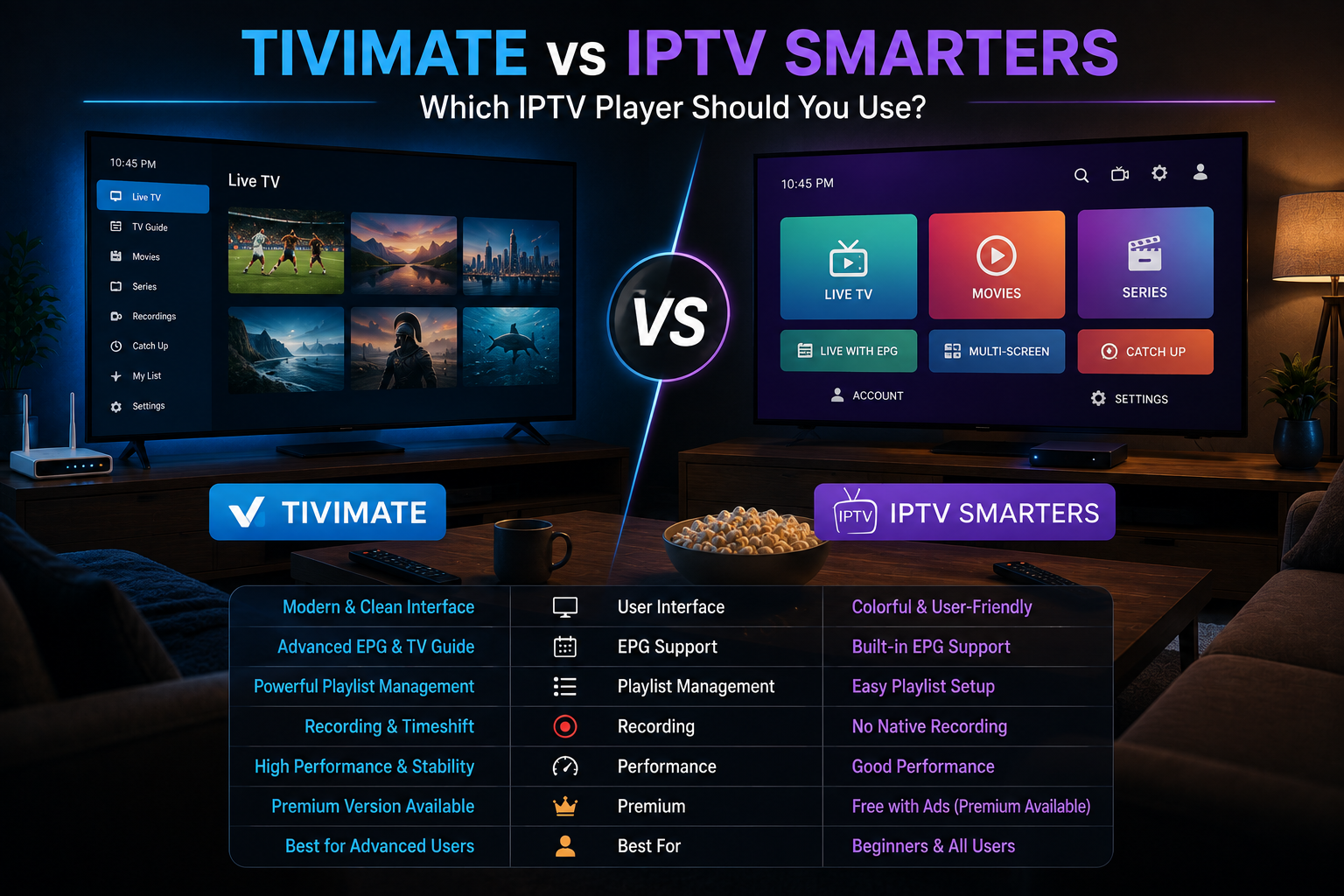
Quick answer: TiviMate may suit you better if you use an Android TV device, Android TV box, or a Fire OS Firestick and want a polished TV-focused interface with advanced EPG and recording features. IPTV Smarters may suit you better if you use multiple device types — particularly iPhone, iPad, Samsung or LG Smart TV, Windows PC, or Mac — or if you want a player that works without sideloading on any Firestick model. The best choice depends primarily on your device, not on which subscription you’re using.
Before comparing the apps: neither TiviMate nor IPTV Smarters provides television channels. Both are player apps — software you install separately that reads the login credentials or playlist link provided by your IPTV subscription. Without an active subscription supplying those credentials, both apps are empty.
FoxTele is not affiliated with TiviMate or IPTV Smarters. App availability, pricing, and features are controlled by their respective developers and may change between updates.
Quick Comparison Table
| Feature | TiviMate | IPTV Smarters Pro |
|---|---|---|
| Android TV / Google TV | Yes — Google Play | Yes — Google Play |
| Fire OS Firestick (4K, 4K Max, etc.) | Yes — via sideloading | Yes — in Amazon Appstore |
| Vega OS Firestick (4K Select, HD 2026) | No — sideloading not supported | Yes — available in Amazon Appstore |
| Android phones / tablets | Yes | Yes |
| iPhone / iPad | No | Yes (as “Smarters Player Lite” on App Store) |
| Apple TV | No | Yes |
| Samsung Smart TV (Tizen) | No | Yes — in Samsung App Store |
| LG Smart TV (webOS) | No | Yes — in LG Content Store |
| Windows | No | Yes |
| Mac | No | Yes |
| M3U playlist support | Yes | Yes |
| Xtream Codes API support | Yes | Yes |
| EPG (Electronic Program Guide) | Yes — widely praised | Yes |
| Recording (PVR) | Yes — Premium only | Varies by version / platform |
| Multi-View | Yes — Premium only | Yes — some versions |
| Free version available | Yes (1 playlist, limited) | Yes (free on most platforms) |
| Premium pricing | ~$9.99/yr or ~$33.99 lifetime* | Free on most platforms* |
| Devices per license | Up to 5 (Premium) | Varies by platform |
*Prices and availability are subject to change. Always verify the current price and listing in your platform’s app store before purchasing.
What Is TiviMate?
TiviMate is an IPTV player built specifically for Android-based television devices. Its interface is designed around large-screen TV viewing — a full-width EPG grid, quick channel switching using a remote control, and a clean layout that closely resembles a traditional cable TV guide.
Where it runs: Android TV, Google TV, Fire OS Firestick (via sideloading), Android phones and tablets, and Android TV boxes.
Where it does not run: iPhone, iPad, Apple TV, Samsung Tizen Smart TVs, LG webOS Smart TVs, Windows, Mac, and Vega OS Fire TV Sticks (the 2025 Fire TV Stick 4K Select and the 2026 Fire TV Stick HD).
Free vs. Premium: The free version of TiviMate supports one playlist, basic live TV browsing, and standard EPG. The Premium upgrade — purchased through the TiviMate Companion app on Google Play (see the TiviMate official site) — unlocks multiple playlists, PVR recording to an external drive, multi-view (watching several channels on screen simultaneously), catch-up TV, and favorites backup. One Premium license covers up to 5 devices.
TiviMate’s channel-switching speed is frequently cited as faster than other IPTV players, which is particularly noticeable when cycling through channels during live sports viewing.
Important for Firestick users: TiviMate is not available in the Amazon Appstore. Installing it on a Fire OS Firestick requires sideloading using the Downloader app. This means TiviMate cannot be installed on Vega OS Firestick models (Fire TV Stick 4K Select and Fire TV Stick HD 2026), which do not support sideloading. For setup guidance on Firestick including sideloading steps, see How to Install IPTV on Firestick.
What Is IPTV Smarters?
IPTV Smarters (developed by WHMCS Smarters) is an IPTV player built around maximum device compatibility. Its interface uses a tab-based layout with separate sections for Live TV, Movies, Series, and Catch-Up — an approach that works well across both phone screens and televisions, though it is generally considered more mobile-oriented than TiviMate’s TV-centric design.
Where it runs: Android phones and tablets, Android TV, Google TV, Android TV boxes, Amazon Firestick and Fire TV (available directly in the Amazon Appstore — no sideloading required), iPhone and iPad (as “Smarters Player Lite” in the Apple App Store), Apple TV, Samsung Smart TVs (Tizen — available in the Samsung App Store), LG Smart TVs (webOS — available in the LG Content Store), Windows, and macOS. See the IPTV Smarters official site for current platform availability.
Where it does not run: No significant mainstream platform exclusions — it is the most broadly compatible IPTV player available.
Free vs. paid: IPTV Smarters is free to download and use on most platforms. Some app store listings may show a purchase price or in-app purchase depending on the platform and app variant — check your specific app store listing for current pricing before downloading. The core functionality (M3U and Xtream Codes credential entry, live TV browsing, EPG, parental controls) is available without payment on most platforms.
Important for Firestick users: IPTV Smarters is in the Amazon Appstore and can be installed on all Fire TV devices — including Vega OS models. If you own a Fire TV Stick 4K Select or Fire TV Stick HD (2026), IPTV Smarters is compatible where TiviMate is not.
Device Compatibility: The Most Important Difference
The most practical difference between these two players is where they run. Your device determines your choice more than any feature comparison does.
If you have a Fire OS Firestick (4K, 4K Max, 4K Plus, Cube, or the 2024 Fire TV Stick HD):
Both apps work. TiviMate requires sideloading (via Developer Options and the Downloader app). IPTV Smarters installs directly from the Amazon Appstore. If you prefer TiviMate’s interface and are comfortable with sideloading, it’s a strong choice. If you want a simpler installation, Smarters requires no settings changes.
If you have a Vega OS Firestick (Fire TV Stick 4K Select or Fire TV Stick HD 2026):
TiviMate is not an option — sideloading is blocked on Vega OS. IPTV Smarters is available in the Amazon Appstore and works on these devices. For more on the Vega OS distinction, the IPTV for Firestick guide explains which models are affected.
If you have an Android TV or Google TV device:
Both apps install via the Google Play Store. TiviMate is the more popular choice for TV-focused viewing on these devices. Smarters also installs cleanly and is a strong alternative for users who prefer its interface or want simpler VOD organization.
If you have a Samsung or LG Smart TV:
TiviMate is not available on Samsung Tizen or LG webOS. IPTV Smarters is available in both the Samsung App Store and LG Content Store. For Smart TV platform-specific guidance, see IPTV for Smart TV.
If you have an iPhone, iPad, or Apple TV:
TiviMate is not available on any Apple platform. IPTV Smarters is available on the Apple App Store — listed as “Smarters Player Lite” on iOS. This makes Smarters the primary IPTV player option for iOS users.
If you use Windows or Mac:
TiviMate is not available on desktop operating systems. IPTV Smarters offers a Windows and macOS version.
Interface and Ease of Use
TiviMate and IPTV Smarters approach the viewing interface from different philosophies.
TiviMate is built around the television experience. Its EPG grid fills the screen with a full schedule view, channel groups are navigated with a remote, and the layout is optimized for couch viewing with minimal button presses. Users transitioning from cable TV often find it the most familiar-feeling interface. It is less intuitive when used on a phone screen.
IPTV Smarters uses a tile-based main menu with large buttons for Live TV, Movies, Series, and Catch-Up. This works well on phones and tablets, and adapts adequately to large-screen TV use. The layout is simpler and quicker for beginners to navigate, though it offers fewer customization options than TiviMate for power users who want granular control over EPG layout, channel groups, and display preferences.
For beginners: IPTV Smarters is generally easier to set up and start using. The credential entry process is straightforward, and the interface requires minimal configuration.
For power users: TiviMate offers more customization depth — custom channel grouping, EPG source management, multiple concurrent playlists, and per-channel settings. See how to fix IPTV buffering for playback troubleshooting.
Live TV and EPG
Both apps support EPG (Electronic Program Guide), which displays schedule information for channels based on data your provider supplies.
TiviMate’s EPG is widely praised for its visual quality and performance. The full grid-style guide is fast to load and easy to navigate with a remote. Multiple EPG sources can be configured, and the refresh schedule is adjustable.
IPTV Smarters’ EPG is functional and adequate for most users. It loads schedule information and displays what’s currently playing and upcoming. Customization options are more limited than TiviMate, but the EPG works reliably for standard daily viewing.
An important clarification: the quality and accuracy of your EPG depends primarily on the data your IPTV provider supplies — not the player app alone. A provider with good EPG data will display well in either app. A provider with poor or missing EPG data will display poorly in both. If your EPG is empty or inaccurate, the cause is usually on the provider’s side.
Both apps support catch-up TV where the provider includes it in their service.
Movies, Series, and VOD Navigation
Both apps organize VOD content into separate Movies and Series sections when using an Xtream Codes API subscription (which allows the player to sort content automatically). With an M3U playlist, organization depends more on how the provider structures their playlist.
TiviMate handles VOD in a functional but TV-focused way — navigated by remote with category browsing. Resume playback is supported.
IPTV Smarters uses a tile-based VOD interface with poster artwork where metadata is available. The tab separation of Movies and Series is prominent in the main menu, making VOD navigation slightly more accessible for users who watch on-demand content frequently.
For either app, the depth and quality of the VOD library comes from your subscription, not the player.
Advanced Features
| Feature | TiviMate | IPTV Smarters |
|---|---|---|
| Recording (PVR) | Yes — Premium, requires external storage | Varies by version and platform |
| Multi-View | Yes — Premium (multiple channels simultaneously) | Yes — some versions |
| Multiple playlists | Yes — Premium | Yes |
| Parental controls | Limited | Yes — built-in |
| Master Search | No native cross-library search | Yes — searches Live, VOD, Series simultaneously |
| Cross-device sync | No | Limited |
On Multi-View: TiviMate Premium allows you to watch multiple channels in a split-screen view simultaneously — useful for following several sports events at once. This is a TiviMate Premium exclusive feature not universally available in Smarters.
On recording: TiviMate Premium allows scheduled PVR recording to an external USB drive connected to your device. This requires compatible hardware and sufficient storage.
Which Player Should You Choose?
There is no universal answer — the right choice depends on your device and preferences.
TiviMate may suit you if:
- Your primary streaming device is an Android TV box, Google TV device, or a Fire OS Firestick (4K, 4K Max, Cube, or 2024 Fire TV Stick HD)
- You want a TV-native EPG interface that feels like a traditional cable guide
- You value fast channel switching
- You want PVR recording or multi-view features
- You’re comfortable with sideloading on Firestick
IPTV Smarters may suit you if:
- You own a Vega OS Firestick (4K Select or Fire TV Stick HD 2026) and cannot sideload
- You use iPhone, iPad, Apple TV, Samsung Smart TV, or LG Smart TV
- You want one app that works consistently across all your devices
- You prefer a simpler setup without sideloading on any device
- You don’t want to pay for a premium player upgrade
Both apps work equally well for: loading Xtream Codes credentials or M3U playlists, displaying EPG data, playing HD and 4K streams where your provider and connection support it, organizing VOD content, and basic daily IPTV viewing.
FoxTele and IPTV Players
FoxTele is an IPTV subscription service — we provide the login credentials (server URL, username, and password in Xtream Codes format, or an M3U playlist link) that you enter into your chosen player app. FoxTele credentials are compatible with both TiviMate and IPTV Smarters, as well as other players that support standard Xtream Codes and M3U formats.
Before subscribing, confirm which player app works on your specific device, and which installation method that app requires. FoxTele support at support@foxtele.us can help you identify the right setup for your device before you order.
If you’re ready to subscribe, explore FoxTele plans to compare the available prepaid durations and start an order request.
Ready to Set Up Your IPTV Subscription?
FoxTele credentials work with both TiviMate and IPTV Smarters. Before you order, confirm which player app is compatible with your device — and contact support if you need help choosing the right setup.
Frequently Asked Questions
Is TiviMate better than IPTV Smarters?
It depends on your device. TiviMate provides a more polished TV-focused interface and faster channel switching on compatible Android-based devices. IPTV Smarters offers broader platform coverage — including iOS, Samsung, LG, Windows, and Mac — and works on all Firestick models including Vega OS devices that don’t support sideloading. Neither is objectively better; the right choice depends on what device you’re using.
Is TiviMate available on iPhone?
No. TiviMate is Android-only and does not run on iPhone, iPad, Apple TV, or any iOS device. For iPhone and iPad, IPTV Smarters (listed as “Smarters Player Lite” on the Apple App Store) is the primary IPTV player option.
Does IPTV Smarters work on Firestick?
Yes. IPTV Smarters is available in the Amazon Appstore and can be installed on all Fire TV devices — including Vega OS models (Fire TV Stick 4K Select and Fire TV Stick HD 2026) that do not support sideloading. TiviMate requires sideloading and is therefore incompatible with Vega OS Firestick models.
Can I use the same IPTV subscription in both TiviMate and IPTV Smarters?
Yes, if your subscription provides Xtream Codes or M3U credentials, you can enter the same credentials into either app. Whether using the same credentials on multiple devices simultaneously is permitted depends on your subscription’s stream limit. Check with your provider before setting up on multiple devices at once.
Do TiviMate or IPTV Smarters include any TV channels?
No. Both are player apps only. They provide the interface for loading and watching streams, but they contain no channels, content, or subscriptions. You need a separate active IPTV subscription that provides login credentials — entering those credentials into the player app is what loads your channel list.
Which player is easier for beginners?
IPTV Smarters is generally considered the more beginner-friendly of the two. The setup process is straightforward — enter your username, password, and server URL, or paste your M3U link — and the tab-based interface is easier to navigate without prior IPTV experience. TiviMate offers more power but has a steeper learning curve for first-time users.
Do I need to pay separately for the player app?
TiviMate has a free version with limited features, and a Premium upgrade (~$9.99/year or ~$33.99 lifetime) purchased through the TiviMate Companion app on Google Play. IPTV Smarters is free to download and use on most platforms. Check your platform’s app store for the current listing and any applicable pricing before downloading. Either way, the player app cost is separate from your IPTV subscription cost.