
The search for the best IPTV for movies almost always starts the same way — with a provider claiming 100,000 movies in their library. That number is not a quality indicator. A poorly organized library of 100,000 untitled, unsorted files is far less useful than a clean, searchable library of 10,000 well-labeled movies where you can find what you're looking for in thirty seconds.
This guide focuses on what actually determines the movie-watching experience on IPTV: how VOD libraries are organized, how the player app shapes everything from subtitle display to resume playback, and how to verify that a service genuinely delivers what you want before paying.
VOD Library Size Is Not the Same as VOD Quality
VOD in IPTV (Video on Demand) refers to the on-demand movie and series library delivered alongside live TV channels through your subscription. Most IPTV subscriptions include a VOD section — how good that section is varies enormously between providers.
When a provider claims "100,000+ movies," that number typically refers to the total number of entries in their VOD catalogue. It says nothing about:
- Whether those entries are correctly labeled and searchable
- Whether the files actually play without errors
- Whether subtitle tracks are included
- Whether the content is organized by genre, year, or language
- Whether the library includes titles you actually want to watch
- Whether "new releases" refers to current theatrical releases or titles from several years ago
A smaller library that is well-maintained, correctly categorized, and fully playable is more useful for most movie viewers than a larger one built on quantity alone. When evaluating providers, ask about the organization and searchability of their VOD library — not just how many titles they claim to offer.
One category worth clarifying separately: claimed "new releases." In an IPTV context, this can mean anything from a film added to the library within the last week to a title from three years ago recently added to their catalogue. Whether a specific current theatrical release is available — and whether the provider holds appropriate authorization to distribute it — requires direct verification, not marketing claims.
How the Player App Shapes Your Movie Experience
The player app you use has as much impact on your movie-watching experience as the provider's library. Two users on the same provider with different player apps will have a meaningfully different experience browsing, searching, and watching movies.
Search and Genre Navigation
Finding a specific movie title in an IPTV library without good search is a significant frustration. Player apps vary in how they present VOD search:
- Title search: Most modern player apps (IPTV Smarters Pro, IPTV One, GSE Smart IPTV) support text search within the VOD section. The quality of the results depends on whether the provider has correctly labeled their content. A file stored as a garbled filename rather than a clean title will not appear in a search for the movie's actual name.
- Genre filtering: Some player apps pull genre metadata from the provider's Xtream Codes API and display it as browsable categories (Action, Drama, Comedy, International, etc.). Others display a flat alphabetical list regardless of how much content is in the library. Genre filtering dramatically reduces browsing time in large libraries.
- Year and rating filters: Advanced player apps can filter VOD by release year or user rating when the provider supplies that metadata. This is useful for narrowing a large library to recent titles.
Before subscribing to any provider, confirm which player app they recommend and test that app's search and genre filtering features — ideally during a trial period.
Metadata, Poster Artwork, and Library Presentation
The difference between a provider's raw VOD list and a proper movie library experience often comes down to metadata — poster artwork, plot summaries, cast information, and runtime.
Some player apps (IPTV One is well-documented for this) automatically pull metadata from the TMDb (The Movie Database) to display poster images and descriptions alongside each title, turning a list of filenames into something that resembles a streaming service interface. Others display only the raw filenames or title strings from the provider.
This matters practically: browsing a library where every entry shows a poster image and a one-line description is a fundamentally different experience from scrolling through plain text entries. If metadata presentation matters to you, test the player app's library view during a trial before committing to a plan.
Resume Playback and Watch History
Resume playback — the ability to stop a movie and pick up where you left off — is a feature of the player app, not the provider. Whether it works, and how reliably, depends on which app you use and how it stores playback position.
Most current IPTV player apps (IPTV Smarters Pro, IPTV One, GSE Smart IPTV, TiviMate) support resume playback for VOD content. Watch history — a record of what you've watched and how far through each title you got — is also a player-side feature.
Cross-device resume sync (starting a movie on your TV and continuing on a tablet) requires a player app that supports cloud-based position sync across multiple device instances. Not all apps offer this. If cross-device movie watching matters to you, confirm that your chosen player app supports it before subscribing to any service.
Subtitles and Multiple Audio Tracks
This is the area where IPTV movie viewers most frequently encounter unexpected limitations — and where understanding the actual technical structure prevents frustration.
Why Subtitles May Not Appear — Provider vs. Player
Subtitle availability in IPTV VOD depends on two completely separate factors working together:
Factor 1 — The provider's content: Subtitles can only be displayed if they exist in the VOD file or stream. For on-demand movie content, subtitle tracks are typically embedded within the video file itself (as SRT, ASS, or similar formats inside an MKV or MP4 container). If the provider did not include a subtitle track when encoding or packaging the content, no player app setting can create one. No subtitle option in the player menu means no subtitle track in the file — this is a provider limitation, not a player configuration issue.
Factor 2 — The player app's decoding: Even when subtitle tracks are present in the file, the player app must support the specific subtitle format to display them. Different apps handle subtitle formats differently: TiviMate supports embedded EIA-608, CEA-708, and DVB subtitle tracks; IPTV Smarters Pro uses VLC or ExoPlayer internally, which may decode different codec sets; Kodi offers the broadest subtitle format compatibility of widely used players.
Practical implication: If subtitles matter to you — for foreign-language films, accessibility needs, or language learning — testing subtitle availability on the specific content you want to watch, using your specific player app, on your specific device, is the only reliable verification method. Ask the provider directly whether their VOD content includes subtitle tracks before subscribing.
External subtitle files (.srt files downloaded separately) can be loaded manually in some player apps (Kodi, IPTV One, VLC) for VOD content, providing a workaround when the provider's file does not include an embedded track. This option is not available for live TV channels.
Multiple Audio Languages
VOD files that include dubbed audio versions — a film available in both its original language and a Spanish, French, or Portuguese dub, for example — carry multiple audio tracks in the same file. Selecting between them is done through the player app's audio track menu during playback.
Whether a specific film in a provider's VOD library includes a dubbed audio track depends entirely on how the provider packaged that content. Most IPTV providers do not systematically document which VOD titles include which audio tracks. If a specific language is important for your viewing, ask the provider directly about that content type, or test it during a trial.
Playback Quality and Buffering for Movies
Movie streaming differs from live sports in one practical way: on-demand content can be buffered ahead. Your player app can load several seconds of video before you need them, which absorbs brief network fluctuations that would cause a visible freeze in a live stream.
The consequence: IPTV movie playback is generally more forgiving of brief network instability than live sports streaming. Sustained slow connections or provider-side issues will still cause buffering, but occasional brief drops are less likely to interrupt a movie than a live sports event.
Playback quality for movies depends on:
- The quality of the source file the provider is streaming (resolution, bitrate, encoding)
- Your internet connection speed and stability
- Your Wi-Fi signal strength, or whether you're using Ethernet
- Your player app and its decoding capabilities
- Your device's processing hardware
Whether any specific movie is available at HD (1080p), Ultra HD (4K), or another resolution depends on how the provider encoded that specific title. Blanket "4K movies" claims without specifying which titles are encoded at 4K are unverifiable marketing. Test the specific content you care about during a trial rather than relying on resolution claims.
Similarly, premium audio formats (Dolby Atmos, Dolby Vision, DTS) require the provider to have encoded that audio into the stream, the player app to support passthrough or decoding of that format, and your device and audio system to support playback. Do not assume any of these are supported without specific verification from the provider.
Internet and Home Network Requirements for VOD
On-demand movie streaming is more forgiving of network conditions than live sports. Typical HD (1080p) movie streaming requires 5–8 Mbps of stable download speed per the FCC Broadband Speed Guide — the same baseline that applies to any HD video streaming. If 4K content is available from your provider, plan for at least 25 Mbps per stream.
For movie watching specifically:
- Wi-Fi is generally adequate for VOD viewing on a stable home network, because the player app's buffer absorbs brief fluctuations
- Ethernet provides more consistent performance if you experience repeated buffering, especially on older Wi-Fi hardware or in densely occupied buildings with many competing networks
- Peak-hour congestion affects available bandwidth — if movies buffer in the evenings but not during the day, a congested home network or ISP connection is the likely cause
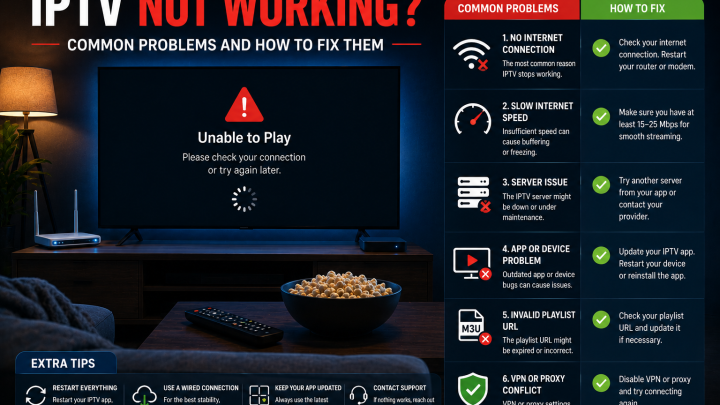
If buffering occurs consistently on VOD content, work through network checks before contacting the provider: restart your router, test with Ethernet if available, clear the player app cache (Settings > Applications > select app > Clear Cache), and check that no other devices are running heavy downloads simultaneously.
Device Compatibility for Movie Streaming
Most compatible IPTV devices handle movie streaming adequately. Device choice matters more for:
- Player app availability: TiviMate is Android-only and is not available on Samsung Tizen or LG webOS natively. If TiviMate's VOD interface is important to you, an Android-based device is required.
- Processor performance for large libraries: Browsing a large VOD library with metadata loading can be slow on underpowered devices. Newer Firestick models (4K Max) and dedicated Android TV boxes typically perform better than entry-level or older streaming sticks.
- Vega OS Firestick limitations: The Fire TV Stick 4K Select (2025) and Fire TV Stick HD (2026) run Vega OS and are restricted to Amazon Appstore apps only. Confirm that your preferred player app is in the Appstore before subscribing.
- Smart TV native apps: Samsung (Tizen) and LG (webOS) have a limited selection of IPTV player apps in their native stores. The VOD interface quality varies by app and may not offer the same metadata presentation or genre filtering as full-featured Android-based players.
For device-specific compatibility guidance, the IPTV for Smart TV and IPTV for Firestick guides cover platform differences in detail.
How to Evaluate the Best IPTV for Movies Before Paying
Questions to Ask Before Subscribing
- "How is your VOD library organized — can I browse by genre, year, or language?"
- "Does your VOD content include subtitle tracks? For which languages?"
- "Do your VOD movies include multiple audio language tracks?"
- "What player app do you recommend for movie viewing on my device? Is it available in the official app store for my platform?"
- "How frequently is the VOD library updated with new content?"
- "What does 'new releases' mean specifically — how recent is the newest content in your library?"
- "What is your refund policy if the movie content I want is not available or the quality is not satisfactory?"
What to Test During a Trial
If a provider offers a trial period, use it specifically to evaluate the features that matter to your movie viewing:
- Search for a specific title you want to watch. Does it appear? Is it correctly labeled?
- Browse by genre. Are genres organized and accurately labeled, or is the library a flat unsorted list?
- Start a movie, pause it, close the app, then reopen. Does the player resume where you stopped?
- Check subtitle availability. During playback, access the subtitle menu. If subtitles are important to you, test on the specific content you care about — not just any randomly selected title.
- Check audio track selection. If you need a dubbed version, verify that multiple audio tracks are available for the titles you want.
- Test during evening hours. Buffering that doesn't occur at 3 PM may occur at 9 PM when network load is higher.
Movie IPTV Red Flags to Avoid
- "100,000+ movies" as the primary quality claim. Library size without organization, searchability, or quality context is a marketing number, not a usability indicator.
- "All new releases available." Without authorization verification, this claim is unverifiable. Specific major theatrical releases are controlled by studio licensing agreements.
- "Guaranteed 4K for all movies." 4K availability depends on how individual titles are encoded. A blanket claim across an entire library is not credible.
- No player app recommendation for your device. A provider who cannot name a compatible player app for your device does not have documented support for your setup.
- No trial or no refund policy. VOD quality varies significantly between providers. Paying without testing means no recourse if the library does not match what was advertised.
- Only cryptocurrency or gift card payment accepted. Standard payment methods with dispute resolution protect you if the service does not deliver as described.
- "Subtitles in all languages." Whether subtitle tracks exist in individual VOD files depends on how each title was encoded. A blanket subtitle guarantee across a large library is not technically realistic.
Before You Subscribe: A Movie IPTV Checklist
Before paying for any IPTV service for movie viewing:
- I have confirmed my device model and OS, and verified that my preferred player app is available for it
- I have asked the provider specifically about VOD search, genre filtering, and library organization
- I have asked whether subtitle tracks are included in VOD content, and for which languages
- I have asked about multiple audio language tracks if dubbed content matters to me
- If a trial is available, I have used it to test search, resume playback, subtitle display, and genre navigation
- I have tested buffering during a typical evening viewing session — not just during off-peak hours
- I have confirmed what "new releases" means for this provider — how recent is the newest content?
- I have found and read the refund policy before making any payment
- I have confirmed the payment method provides dispute resolution if needed
- I know which player app to use and understand that resume playback and subtitle display are player features, not provider features
How FoxTele Works for Movie Viewers
FoxTele is a US-market IPTV service with prepaid, non-recurring plans.
Plans:
| Plan | Price |
|---|---|
| 3 Months | US$30 |
| 6 Months | US$45 |
| 12 Months | US$70 |
Supported devices include: Amazon Firestick, Android TV and Android Box, Samsung and LG Smart TV, MAG Device, mobile and tablet, Windows PC, and Mac. Confirm compatibility for your specific device and model before subscribing.
Order process: Select a plan on the FoxTele website, submit your order request, FoxTele reviews the request, you receive a payment link by email or WhatsApp, complete payment, then receive your setup and activation information. There is no automatic checkout.
For movie viewers specifically: Before subscribing, contact FoxTele support to confirm what VOD content is available in your plan, whether subtitle tracks are included in their movie library, and which player app they recommend for your device and viewing preferences. These are the same questions recommended for any provider in this guide.
VOD library details, subtitle availability, audio track availability, 4K access, and exact movie count are subject to current policy and should be confirmed directly with FoxTele before subscribing.
Contact:
- Email: support@foxtele.us
- WhatsApp: +1 450-485-2195
Looking for IPTV for movie nights? Before choosing a service, confirm your device compatibility, preferred player app, subtitle requirements, and VOD organization before paying. Explore FoxTele plans or contact support with compatibility questions.
Looking for IPTV for Movie Nights?
Before choosing a service for movies, check your preferred device, player app, subtitle needs, playback requirements, and the exact content you want. Review FoxTele plans or contact support with compatibility questions before submitting an order request.
Frequently Asked Questions
What is the best IPTV for movies?
There is no single best option — the right service depends on how well their VOD library is organized, whether your preferred player app supports genre filtering and resume playback, whether subtitle and audio track requirements are met, and how the service performs on your specific device. Use the criteria in this guide — VOD usability, subtitle and audio verification, player app features, and pre-payment testing — to evaluate any provider before subscribing.
What does VOD mean in IPTV?
VOD stands for Video on Demand. In an IPTV context, it refers to the on-demand movie and series library delivered alongside live TV channels through your subscription. Unlike live TV, VOD content can be watched at any time, paused, rewound, and replayed. The quality of the VOD experience depends on how the provider organizes their library and which player app you use to access it.
Can IPTV movies have subtitles?
Yes — but only if the provider included subtitle tracks in the VOD file, and only if your player app can decode the subtitle format. If the subtitle option in your player app shows an empty list, the provider's file does not include a subtitle track — this is a provider-side limitation, not a settings issue. For VOD content (movies, series), subtitle tracks are more commonly present than in live TV channels. Test subtitle availability on the specific content you care about during a trial before subscribing.
Can IPTV support multiple audio languages?
Multiple audio tracks (original language plus dubbed versions) can be included in a VOD file by the provider. Selecting between them is done through the audio track menu in your player app during playback. Whether a specific film in a provider's library includes a dubbed version depends entirely on how the provider packaged that content. Ask directly about multi-language audio availability for the type of content you watch before subscribing.
Why do IPTV movies buffer?
Movie buffering is most commonly caused by a slow or unstable internet connection, Wi-Fi signal weakness, or a full player app cache. Unlike live sports, on-demand movie content can be pre-buffered several seconds ahead, making it more forgiving of brief network disruptions. For persistent buffering: test with Ethernet if available, clear the player app cache (Settings > Applications > select your app > Clear Cache), and test during off-peak hours to isolate whether congestion is the cause.
How do I verify movie availability before subscribing?
Ask the provider directly about their VOD library organization, whether subtitle tracks are included in their content, and what "new releases" means in their context. If a trial is available, test search functionality, genre filtering, resume playback, and subtitle display on specific titles you want to watch — at typical evening viewing hours, not just off-peak. Read the refund policy before paying. The checklist in this guide covers each verification step.