If you’ve started researching IPTV services for the US market, you’ve likely noticed that nearly every result promises the same things: thousands of channels, flawless 4K, and the best price available. Most of those claims are unverifiable marketing.
What actually separates a reliable IPTV subscription from a frustrating one isn’t the headline channel count. It’s a combination of device compatibility, network performance, payment honesty, and accessible support — none of which shows up in a promotional description.
This guide walks through the criteria that matter, the questions worth asking any provider, and the warning signs that should give you pause before paying.
What “Best” Actually Means for Your Household
There is no single best IPTV service for every US viewer, because households have different priorities.
A single viewer watching HD content on a Firestick has different requirements than a household with three people on different devices who want sports, general entertainment, and children’s programming simultaneously. The “best” service is the one that reliably meets your specific combination of device support, viewing habits, stream count, and budget.
Before comparing providers, it helps to define your own requirements:
- How many simultaneous streams do you need? Many providers offer one active stream at a time per plan. If your household expects multiple people watching at once, confirm whether the plan supports that.
- Which devices will you use? Not every service supports every device equally well.
- What content matters most? Live sports, general entertainment, international content, and children’s programming can vary significantly in quality and availability between providers.
- How important is flexibility? A shorter plan costs more per month but lets you exit if the service disappoints.
How IPTV Works — and What You Actually Need to Set It Up
IPTV stands for Internet Protocol Television. Rather than receiving a signal from a cable wire or satellite dish, content is delivered over your home internet connection. The result is a flexible viewing experience that works across a wide range of devices, provided your connection is strong enough.
To watch IPTV you need two separate components working together.
The Player App and the Subscription Are Two Separate Things
This distinction surprises many first-time subscribers. When you sign up with an IPTV provider, you receive login credentials — either an M3U playlist link or Xtream Codes (a username, password, and server address). Those credentials are not the viewing app. They are the access key to the content.
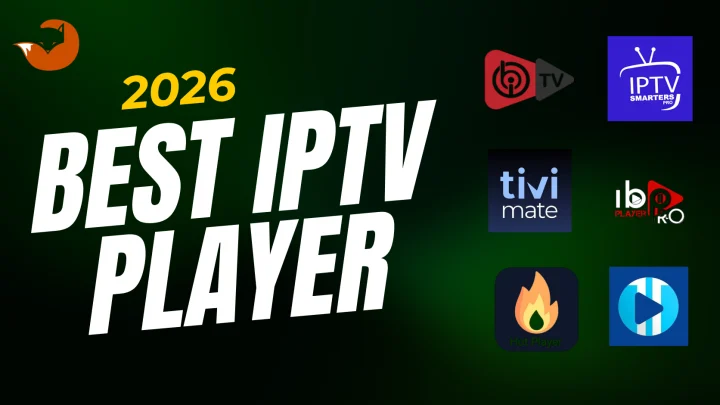
The player app is what you install on your device to display channels and navigate the guide. Popular options include TiviMate (widely used on Firestick and Android TV), IPTV Smarters Pro (available across most platforms), and GSE Smart IPTV (common on iOS). Most player apps are free to download, though some have paid tiers for additional features.
You enter your subscription credentials into the player app, your channel list loads, and you begin watching. Neither component works without the other.
Why this matters practically: Some providers bundle a compatible player into their setup process. Others provide credentials only and expect you to source and configure a player app independently. Knowing which applies to a service you’re considering prevents setup frustration after payment.
Device Compatibility: What to Verify Before You Subscribe
Most IPTV providers list device categories on their website. Before taking that list at face value, it’s worth understanding what “compatible” usually means.
IPTV compatibility typically means the service delivers credentials in a format a player app on that device can read. It does not necessarily mean a purpose-built, app-store-listed app exists for every listed device. Some services rely on sideloaded apps — applications installed outside the official app store — which introduces additional setup complexity and, in some cases, security considerations.
Questions worth asking a provider before subscribing:
- Which specific player apps does your setup guide recommend for my device?
- Is the app available in the official app store for my device, or does it require sideloading?
- Do you have a setup tutorial for my specific device model?
Device categories that typically indicate good compatibility: Amazon Firestick, Android TV or Android Box, Samsung and LG Smart TVs, MAG Devices, Windows PC, macOS, and mobile/tablet (Android and iOS). Verify which of these your provider actually supports with documented setup instructions, not just a marketing checkbox.
Internet Speed and Home Network Considerations
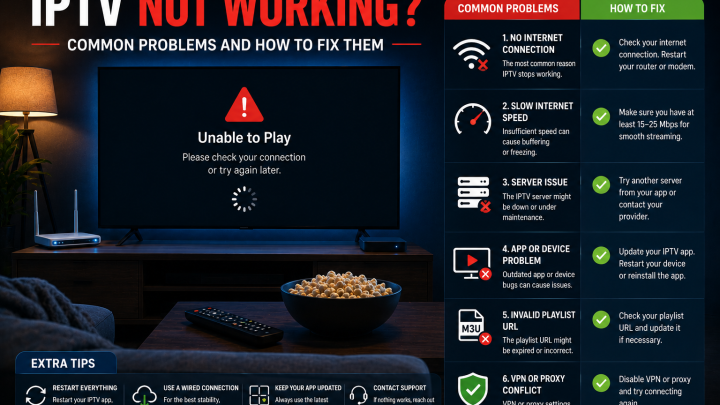
Your internet connection is as important as your IPTV subscription. A reliable service running on an undersized connection will still buffer.
General speed guidelines for IPTV streaming:
| Quality | Minimum per stream | Comfortable per stream |
|---|---|---|
| Standard Definition (SD) | 3–5 Mbps | 5 Mbps |
| High Definition (HD / 720p–1080p) | 5–10 Mbps | 10–15 Mbps |
| 4K / Ultra HD | 25 Mbps | 40–50 Mbps |
These figures apply per active stream. A household with two people watching simultaneously on HD needs at least 20–30 Mbps available for streaming alone, with additional headroom for other connected devices.
Network setup considerations:
- A wired Ethernet connection delivers more stable performance than Wi-Fi, particularly for live sports where a brief dropout is immediately visible.
- Wi-Fi signal strength degrades with distance and through walls. A device positioned far from the router may struggle even when the overall connection speed is adequate.
- Peak-hour network load matters. Multiple users streaming, gaming, or downloading simultaneously can reduce available bandwidth below the threshold needed for smooth playback.
- Buffering isn’t always the provider’s fault. Before concluding a service is unreliable, test with an Ethernet connection and with no other heavy network activity running.
If you run into playback problems after subscribing, restarting your router and testing via Ethernet before contacting support often resolves the issue.
Understanding Plan Lengths and Effective Cost
IPTV providers typically offer the same channel access and features across plan durations. The difference between a 3-month and a 12-month plan is not what you get — it’s the effective monthly cost and how long you’re committing.
General pricing structure in the US market:
| Plan duration | Typical approach | Best suited for |
|---|---|---|
| 1 month | Entry point; highest cost per month | Testing a service you haven’t used before |
| 3 months | Moderate savings vs. monthly | After you’ve confirmed the service works on your devices |
| 6 months | Popular middle ground; meaningful savings | Regular viewers who’ve tested and are satisfied |
| 12 months | Lowest effective monthly cost | Viewers who’ve confirmed quality and want fewer renewals |
The sensible approach for first-time subscribers: start with a short plan or use a trial if one is offered. Confirm the service performs on your actual device before committing to a longer duration. The modest premium for a short initial plan is worth the insurance against paying six months upfront for a service that doesn’t suit your setup.
One detail to watch: confirm whether a plan is a prepaid, one-time payment for the duration listed, or a recurring subscription that charges automatically. These are meaningfully different, and the billing model should be clearly stated before payment.
What Good Customer Support Looks Like
Support quality is one of the most reliable indicators of how a provider will perform when something goes wrong — and with IPTV, occasional issues are normal. Your connection, your device, and the provider’s servers are all variables.
When evaluating support, look for:
- Pre-sales responsiveness: Send a question before you subscribe. How quickly does the provider respond? Do they answer specifically, or offer vague marketing language?
- Available contact channels: Email, WhatsApp, or a live chat system are all reasonable. A provider who cannot be reached before you pay is unlikely to be reachable after a problem arises.
- Documented setup guides: A provider who invests in setup documentation for multiple devices is demonstrating commitment to the subscriber experience.
- Realistic promises: No provider can honestly guarantee zero buffering or 100% uptime. A provider who makes these claims in writing is overstating what any internet-delivered service can reliably deliver.
Payment, Trial, and Refund Transparency
These three areas are where provider credibility becomes clearest.
Trials: A provider offering a genuine trial period gives you the opportunity to verify that the service actually works on your device before committing money. Always test during evening or weekend hours — peak demand periods are when server quality becomes apparent. A service that performs well on a Tuesday afternoon may behave differently during a Saturday prime-time sports event.
Payment methods: Providers accepting standard payment methods (credit card, PayPal, or established payment processors) create a traceable transaction with available dispute resolution. Providers who accept only cryptocurrency, gift cards, or wire transfers make refund disputes significantly harder. This is a meaningful due-diligence point.
Refund policy: Before paying, find the provider’s refund policy and read it. For consumer guidance, review FTC consumer protection resources. Note whether a refund applies to the full subscription period, a portion of it, or only within a specific window. Understand the conditions under which a refund is granted or denied. This should be findable on the provider’s website before you are asked for payment.
Legal and Authorization Considerations
IPTV technology itself is legal. The legality of a specific service depends on whether the content it distributes is properly licensed. In the US, Digital Millennium Copyright Act (DMCA) requires that content providers secure appropriate licenses before streaming copyrighted material. The Protecting Lawful Streaming Act, enacted in 2020, made large-scale unauthorized streaming a felony offense targeting commercial operators.
Enforcement has historically focused on providers rather than individual subscribers, but this does not eliminate considerations for end users.
Questions worth considering before subscribing:
- Does the provider clearly state what content is included and under what authorization?
- Are their marketing claims specific and verifiable, or do they rely on vague language about “thousands of channels” without details?
- Does the provider have verifiable contact information, an operating history, and identifiable ownership?
A provider who cannot or will not answer straightforward questions about their service and content authorization is a provider worth approaching with caution.
Provider Evaluation Checklist
Use this framework before committing to any IPTV subscription.
| Evaluation area | Questions to ask | What to look for |
|---|---|---|
| Device support | Which specific devices are supported? Is the app in the official store? | Documented setup guides for your actual device |
| Trial or testing | Is a trial available? What does it cover? | Genuine access, not a “demo” with limited channels |
| Payment methods | What payment options are accepted? | Credit card, PayPal, or established processors |
| Refund policy | Under what conditions are refunds granted? | Written policy before payment is required |
| Stream count | How many simultaneous streams does the plan include? | Confirmed in writing, not assumed |
| Support contact | How can I reach support, and what are their hours? | Pre-sales response test recommended |
| Content claims | Are channel and VOD counts specific and verifiable? | Avoid wildly inflated numbers without documentation |
| Billing model | Is this a one-time prepaid plan or a recurring charge? | Clearly stated before checkout |
| Authorization | What does the provider say about content licensing? | Specific, honest responses rather than evasion |
Red Flags Worth Walking Away From
These patterns consistently appear with unreliable or deceptive providers:
- No trial or pre-payment test of any kind
- Payment accepted only in cryptocurrency, gift cards, or wire transfer
- “Lifetime access” offers at a single low price
- Claims of zero buffering or 100% uptime in writing
- Wildly inflated channel counts (50,000+ channels is a common unverifiable claim)
- No identifiable contact information or company details
- No refund policy or a vague “no refunds” policy with no exceptions
- Prices well below the range typical for sustainable service infrastructure
- Only perfect reviews with no negative feedback anywhere
A “Before You Pay” Checklist
Before submitting payment to any provider, confirm the following:
- I have confirmed the service supports my specific device with documentation or setup guide
- I understand what player app I’ll use and how to configure my subscription credentials
- I have tested the service during peak hours if a trial is available
- I know the plan duration, total cost, and whether billing is one-time or recurring
- I have read and understood the refund policy
- I have confirmed the payment method is standard and offers dispute resolution
- I have tested or received a response from customer support before paying
- I understand how many simultaneous streams the plan includes
- I know the steps that happen after I pay — what I receive, and when
How FoxTele Approaches These Criteria
FoxTele is a US-market IPTV provider with prepaid, non-recurring FoxTele plans.
Plans and pricing:
| Plan | Price |
|---|---|
| 3 Months | US$30 |
| 6 Months | US$45 |
| 12 Months | US$70 |
Payment process: FoxTele uses a manual order process. You select a plan, submit your order information, receive a payment link by email or WhatsApp, complete payment, and then receive setup and activation information. There is no automatic checkout. Payment is not taken before order review.
Supported devices: Samsung and LG Smart TV, Android TV and Android Box, Amazon Firestick, MAG Device, mobile and tablet, Windows PC, and Mac (macOS).
Contact: You can contact FoxTele support; support is available at support@foxtele.us and via WhatsApp at +1 450-485-2195.
Limitations to be aware of: The stream limit per plan and trial terms should be confirmed directly with FoxTele before subscribing, as these details are subject to change and should be verified against the current terms at the time of purchase. For common questions, see the FoxTele FAQ.
Ready to compare plan durations and start the order process? View FoxTele plans.
Ready to Compare FoxTele Plans?
Review the available 3-month, 6-month, and 12-month plan durations. When you’re ready, submit an order request — FoxTele will send your payment link by email or WhatsApp.
Frequently Asked Questions
What internet speed do I need for IPTV? For standard definition streaming, a minimum of 5 Mbps per stream is generally workable. For HD at 720p or 1080p, plan for 10–15 Mbps per stream. For 4K content, you’ll want at least 25–40 Mbps per stream. Add headroom for other connected devices and users in your household. A wired Ethernet connection will outperform Wi-Fi for live content.
What is the difference between an IPTV player and an IPTV subscription? Your subscription provides access credentials — either an M3U link or Xtream Codes. Your player app (TiviMate, IPTV Smarters, GSE Smart IPTV, and others) is the software that reads those credentials and displays your channels. You need both. The player app is typically free; you pay for the subscription separately.
Is IPTV legal in the USA? IPTV as a technology is legal. Whether a specific service is legal depends on whether its content is properly licensed. US copyright law requires content providers to secure appropriate distribution rights. When evaluating a provider, look for transparency about what they offer and how they operate. If a provider cannot or will not answer questions about their content and authorization, that warrants careful consideration before subscribing.
What does “one active stream” mean? Many IPTV providers limit a single plan to one stream playing at a time. This means if two people in the same household want to watch different content simultaneously, a single-stream plan will not support that. Confirm the stream limit of any plan you’re considering before purchasing, and ask whether multi-stream plans are available if your household needs them.
How do I recognize a reliable provider? Reliable indicators include: a genuine trial period or clear refund policy, standard payment options with dispute resolution, verifiable contact information with documented pre-sales responsiveness, device-specific setup guides, and honest claims that don’t promise zero buffering, unlimited everything, or specific licensed content without documentation. The red-flags checklist earlier in this guide covers the most common warning signs in detail.
What happens after I pay? This depends on the provider. With FoxTele, the process is: select a plan, submit your order request, receive a payment link by email or WhatsApp, complete payment, then receive your setup and activation information. With providers using automated checkout, activation may happen immediately after payment. Ask any provider what to expect and how long activation typically takes before you commit.
Service availability, channel access, quality, and pricing are subject to change. Device support depends on your specific hardware, network conditions, and player app. Verify current terms with any provider before subscribing. Nothing in this guide constitutes legal advice; consult a qualified attorney for specific legal questions.